


EU VAT Validation in VIES
Check a customer’s VAT number in VIES with one click and see right away which companies have a valid EU VAT number.
About the module
The module checks a company’s EU VAT number in VIES and saves the confirmation date on the organization. The merchant can see right away which companies have a valid VAT number.
Compatibility
The EU VAT Validation in VIES module is part of Satisfly B2B Suite. It works with version 2.4.7 and later, is compatible with Mage-OS and Magento Open Source, and works with popular themes such as Hyvä and Luma.
How it works
-
Bridge to the VAT validation module
The package connects Satisfly’s existing satisfly/module-vat-validation module, which queries VIES, with B2B company accounts. The base module also works on its own, without the bridge.
-
Magento admin
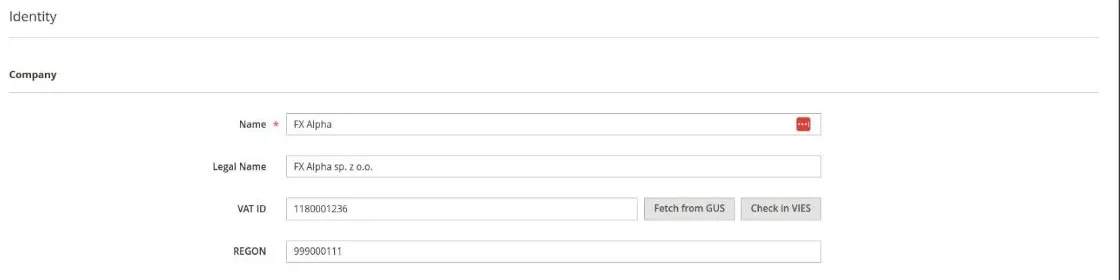
Next to the VAT ID field of a saved organization, there is a “Check in VIES” button. A hint next to the field shows the date the number was last confirmed.
-
Automatic checks
The VAT number is checked automatically when a company registers in the store or when its administrator changes the number. The merchant sees the result next to the application.
-
Check results
There are three possible results. For a valid number, the module saves the confirmation date, and for an invalid number it clears the date. If the check fails because VIES is unavailable or the country is outside the EU, nothing is saved, because such a result says nothing about the number.
-
Country detection
The country is read from the two-letter prefix of the VAT number. If there is no prefix, the module takes the country from the default billing address and, as a last resort, assumes Poland.
1. Open the organization
Go to Customers > B2B > Organizations and edit a saved organization with a VAT number.
2. Check in VIES
Click “Check in VIES” and confirm. The page shows whether VIES confirms the number.
Notes and limitations
What to know before you roll out VAT validation in VIES.
-
 The check reads the VAT number saved on the organization, not the one entered in the form, so save your changes first
-
VIES covers EU member states only


